reMarkable has become the benchmark for paper-like tablets since its first device launched in 2017, building on a vision set by its Norwegian founders earlier in the decade. Designed to replicate the feel of pen on paper, it carved a premium niche by focusing on a single task exceptionally well, digital handwriting.
The brand targets professionals, students, and creatives who value deep focus, long-form thinking, and tidy document workflows without typical tablet distractions. Its reputation as a major player comes from consistent hardware refinement, thoughtful software updates, and a clear product philosophy that favors simplicity over app overload.
reMarkable’s appeal rests on its ultra-low latency stylus experience, crisp E Ink display, and lightweight hardware that travels easily. Users praise features like PDF markup, templates, handwriting-to-text conversion, and cloud sync that keeps notes accessible across devices. With a distraction-minimized interface and long battery life, the device feels purpose-built for reading, reviewing, and writing.
Key Criteria for Evaluating reMarkable Tablet Competitors
Choosing a reMarkable alternative means balancing writing feel, software depth, and ecosystem fit. The best option should match your workflows today and adapt to how you will work six months from now.
- Writing feel and pen accuracy: Look for low latency, precise stroke tracking, and natural friction that mimics paper. Tilt, pressure sensitivity, and nib options matter for sketching and annotation fidelity.
- Display quality and eye comfort: E Ink type, resolution, contrast, and front light uniformity affect readability and strain. Anti-glare treatments and refresh behavior influence daily note-taking performance.
- Note-taking software and ease of use: Templates, layers, tags, hyperlinking, and handwriting-to-text can speed up complex projects. A clean interface with reliable sync reduces friction and learning time.
- File compatibility and workflow integration: Robust PDF annotation, EPUB support, and easy import or export are essential. Check integrations with email, calendar, and popular cloud storage services for smooth sharing.
- Ecosystem and cross-platform apps: Companion apps on desktop and mobile should be fast and stable. Consider whether you can access, search, and share notes anywhere you work.
- Price and total cost of ownership: Factor in the device, pen, folio, replacement nibs, and any subscriptions. Assess long-term value compared to your usage intensity.
- Privacy, security, and support: Review data policies, encryption options, and offline functionality. Warranty coverage, firmware update cadence, and customer service responsiveness can save time and risk.
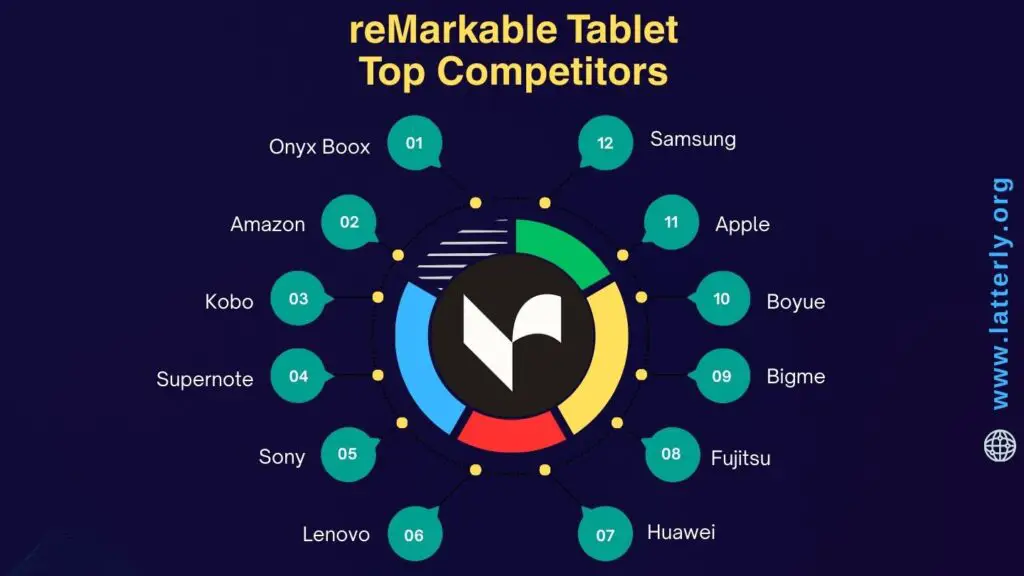
Top 12 reMarkable Tablet Competitors and Alternatives
Onyx Boox
Onyx Boox is recognized for powerful E Ink tablets that run Android, blending paperlike reading with app flexibility. Professionals and students choose Boox for its high performance and broad format support. The brand spans sizes from compact readers to large note devices with advanced stylus tools.
- Strong market presence in the premium E Ink segment, with global distribution and active development cycles that add features frequently.
- Runs Android with access to third party apps, which appeals to users who want more than a single purpose note device.
- Wide product range that includes Note Air and Tab series, giving buyers options for size, storage, and performance needs.
- Sharp, high contrast displays with front lights and warm color temperature controls, suitable for day and night work.
- Robust note taking, layers, handwriting conversion, and PDF markup tools, plus keyboard support for mixed workflows.
- Strong file compatibility, including EPUB, PDF, MOBI, and office formats, which reduces conversion friction.
- Compared with reMarkable, Boox offers app versatility and front lighting, which can be decisive for road warriors and researchers.
- Frequent firmware updates, cloud sync options, and OCR features create a comprehensive productivity platform.
Amazon
Amazon leverages its Kindle ecosystem to bring note taking to a massive audience through Kindle Scribe. Millions already use Kindle for ebooks, which lowers adoption barriers for writing on E Ink. The company emphasizes tight content integration and a polished store experience.
- Global brand recognition and retail reach ensure easy availability, competitive pricing, and strong customer support.
- Kindle Scribe integrates with the Kindle Store, delivering frictionless access to a vast library and personal documents.
- Pen input supports sticky notes in Kindle books and freeform notebooks, making it a seamless extension for readers who annotate.
- High capacity battery life and a large display help long reading sessions and spacious writing canvases.
- Cloud sync via Amazon services simplifies document delivery and backup, which appeals to Kindle loyalists.
- Compared to reMarkable, Amazon provides tighter ebook integration and an unmatched bookstore, useful for heavy readers who also want to write.
- Firmware updates continue to expand notebook templates, writing tools, and PDF features, improving functionality over time.
- Accessories and cases are widely available, and multiple pen options give users choice in ergonomics.
Kobo
Kobo is a major ebook brand in many regions, and its Elipsa line extends that strength into handwriting. The company is known for openness and library integration via OverDrive. Readers who value note taking within an open ecosystem often consider Kobo.
- Strong presence in Canada, Europe, and other markets, supported by partnerships with local retailers and libraries.
- Elipsa 2E offers pen input on a large E Ink display, combining markups, notebooks, and PDF annotation.
- OverDrive integration enables borrowing and annotating library ebooks, a unique advantage for students and avid readers.
- Support for EPUB and other open formats reduces lock in and eases document management for diverse collections.
- Front light with adjustable warmth supports reading and writing in low light without eye strain.
- Compared to reMarkable, Kobo provides stronger native ebook features and library access, ideal for readers who prioritize content discovery.
- Templates, handwriting conversion, and export tools provide a reliable note pipeline to cloud services.
- Eco focused materials in recent devices appeal to buyers who value sustainability alongside functionality.
Supernote
Supernote focuses on writing feel and durable pens, aiming for a notebook experience that resonates with authors and professionals. Its devices emphasize reliability and distraction light software. The brand has cultivated a loyal community that values minimalism with thoughtful features.
- Market reputation for excellent pen glide and long lasting tips, which reduces maintenance and cost over time.
- Folios and pens are designed for everyday carry, targeting users who write extensively and need comfort.
- Software stresses organization, calendar integration, and stable performance rather than app bloat or frequent UI changes.
- Handwriting conversion and cross document linking help researchers and journaling enthusiasts maintain context.
- Cloud sync options and simple file export make it easy to share notes without complex workflows.
- Compared to reMarkable, Supernote competes directly on writing feel and durability, appealing to heavy note takers.
- Long battery life and light operating system keep the focus on writing, with minimal distractions.
- Active community feedback informs firmware updates, which steadily add practical features users request.
Sony
Sony pioneered the Digital Paper category for enterprises that need secure, large format PDF workflows. Legal, education, and corporate users appreciate its focus on reading and annotation. The devices favor simplicity, clarity, and lightweight hardware.
- Strong brand credibility in professional markets, backed by enterprise partnerships and deployment experience.
- Large, thin E Ink displays that excel for PDF viewing, contracts, and technical documentation.
- Low latency pen input and precise annotation make it reliable for review sessions and signatures.
- Minimalist software reduces distractions, aligning with teams that want a pure reading and markup tool.
- Integration options for secure document transfer appeal to IT departments with strict policies.
- Compared to reMarkable, Sony emphasizes enterprise grade PDF handling and ultra light hardware, ideal for specialized workflows.
- Long battery life and glare free screens help with intensive reading in office or field environments.
- Accessories and folios are tuned for portability, supporting daily business use.
Lenovo
Lenovo brings its PC ecosystem experience to digital note taking with Lenovo Smart Paper. Users familiar with Lenovo software and services find the onboarding smooth. The brand targets education and work scenarios that blend notes with cloud sync.
- Global hardware footprint ensures broad availability and support, which reduces risk for buyers.
- Smart Paper offers pen input on E Ink, plus organization tools designed for classes and meetings.
- Cloud services and companion apps provide cross device access, useful for Windows and Android users.
- Templates, handwriting recognition, and search help turn handwritten notes into actionable items.
- Battery life and front lighting support all day use in classrooms, offices, and commutes.
- Compared to reMarkable, Lenovo positions closer to mainstream productivity with strong app companions and ecosystem tie ins.
- PDF markup and document import are straightforward, aiding syllabus review and project planning.
- Accessories, sleeves, and replacement tips are easy to source through Lenovo retail channels.
Huawei
Huawei extends its device lineup with the MatePad Paper, combining E Ink note taking with modern connectivity. The brand is known for premium hardware design and long battery life. It aims to merge reading, annotation, and audio features for a balanced experience.
- Attractive hardware with slim profiles and quality materials creates a premium feel in hand.
- Pen latency and pressure sensitivity are tuned for natural writing, improving legibility and speed.
- Integrated microphone and audio playback support voice notes and listening while reviewing materials.
- Cloud sync and companion apps help users move files among Huawei phones, tablets, and laptops.
- Front light with adjustable warmth allows comfortable night reading and note taking.
- Compared to reMarkable, Huawei emphasizes multimedia additions and ecosystem integration, valuable for mixed media study.
- PDF and ebook support, plus handwriting conversion, cover common academic and professional needs.
- Battery endurance and efficient standby make it practical for travel and daily commutes.
Fujitsu
Fujitsu Quaderno is popular with business users who need a light, large E Ink device for document review. The brand concentrates on clarity, portability, and comfortable writing. Its focus is PDF centric workflows and simple organization.
- Strong presence in professional circles, especially in Japan and enterprise deployments.
- Large screen models that are extremely light, making them ideal for lengthy reading without fatigue.
- Responsive pen input with low latency supports detailed annotation and diagramming.
- Minimalist interface keeps tasks focused on reading, marking, and filing documents efficiently.
- Reliable battery life supports extended review sessions across multiple days of work.
- Compared to reMarkable, Fujitsu offers ultralight hardware and a pure document focus, appealing to contract and policy reviewers.
- Simple file transfer and cloud options provide predictable, IT friendly workflows.
- High contrast screens help reduce eye strain during intense revision periods.
Bigme
Bigme is an innovator in color E Ink devices for note taking and reading. Creatives and business users who need color highlights often look to Bigme. The brand develops feature rich hardware with cameras and fast processors.
- Color E Ink panels enable color coded notes, charts, and markups, useful for education and design.
- Android based systems allow installation of productivity and reading apps beyond the stock suite.
- Cameras and OCR tools support scanning and converting paper notes into searchable files.
- Front lighting with color warmth keeps text readable, while color layers add context without glare.
- Multiple screen sizes accommodate portability or desktop style review sessions.
- Compared to reMarkable, Bigme offers color annotation and broader app usage, a key differentiator for visual workflows.
- Active updates and beta features appeal to early adopters who want cutting edge capabilities.
- Good PDF performance and stylus customization provide flexibility for complex documents.
Boyue
Boyue, known for Likebook devices, blends reading and writing with Android flexibility. The brand offers cost effective E Ink tablets that still handle notes and PDFs well. Budget conscious users who want app access often consider Boyue.
- Competitive pricing makes E Ink note taking accessible to more students and freelancers.
- Android support enables third party reading apps, cloud drives, and note tools tailored to user preferences.
- Front lit displays and warm light settings support comfortable reading day or night.
- Pen input supports annotation and simple sketching, which is enough for many daily tasks.
- Expandable storage on some models adds value for large libraries and offline archives.
- Compared to reMarkable, Boyue stands out for affordability and app flexibility, a practical combination.
- Frequent model refreshes provide options for size and performance without premium pricing.
- Good format compatibility reduces conversion and keeps workflows simple.
Apple
Apple iPad with Apple Pencil is a mainstream choice for digital note taking that doubles as a full tablet. Students and professionals value its fast performance and rich app ecosystem. It serves as a versatile alternative for users who work across media types.
- Dominant market presence and robust support make deployment and accessory sourcing straightforward.
- Apple Pencil provides low latency ink, pressure sensitivity, and tilt, excellent for handwriting and illustration.
- Extensive apps for notes, PDF markup, mind maps, and creative work outperform most E Ink software breadth.
- High refresh displays and color accuracy suit design, presentations, and media consumption.
- Cloud sync via iCloud, plus integrations with Google and Microsoft, streamline cross device workflows.
- Compared to reMarkable, iPad offers speed, color, and apps, ideal for users who prioritize versatility over paperlike screens.
- Keyboard and trackpad accessories turn the device into a light laptop for full productivity.
- Strong resale value and long software support windows reduce total cost of ownership.
Samsung
Samsung Galaxy Tab with S Pen brings premium Android hardware to handwriting and drawing. The brand is a leader in OLED displays and mobile performance. Users invested in Google apps or Samsung services find the integration seamless.
- Wide range of tablets from compact to large, ensuring options for budget and performance needs.
- S Pen is included with many models, offering low latency, tilt, and button shortcuts for efficient note taking.
- Super AMOLED or high refresh LCD screens provide vivid color, beneficial for slides, art, and multimedia.
- Samsung Notes syncs across devices, with handwriting search, import, and PDF annotation features.
- DEX mode and keyboard cases support desktop like multitasking for productivity on the go.
- Compared to reMarkable, Samsung offers a full color, high speed environment with broad app support.
- Integration with Microsoft Office, Google Workspace, and cloud storage simplifies collaboration.
- Strong battery life and fast charging keep the device ready for long classes and meetings.
Microsoft
Microsoft Surface devices with Slim Pen bridge laptop performance and pencentric workflows. Business users and students who rely on Windows apps appreciate the continuity. The combination of pen input and full desktop software creates a powerful all in one solution.
- Established presence in enterprise and education, with IT tools that support management and security.
- Surface Pen delivers precise inking and tilt, paired with excellent palm rejection for natural writing.
- Runs full Windows, enabling desktop apps like OneNote, Word, and Adobe Acrobat for robust note and PDF work.
- High resolution, color accurate screens help with design, data visualization, and presentation prep.
- Keyboard covers and docking support make it easy to shift from tablet mode to full workstation.
- Compared to reMarkable, Surface prioritizes power, multitasking, and software breadth over paperlike displays.
- OneNote offers cloud sync, handwriting search, and collaboration features that scale across teams.
- Accessory ecosystem and long driver support benefit professionals who need reliability and expansion.
Top 3 Best Alternatives to reMarkable Tablet
Onyx Boox Note Air 3
Why it stands out: a full Android platform with a fast processor, rich PDF tools, and broad file support, paired with a premium E Ink display. It handles note taking, reading, and multitasking with ease, and there is a color model available for those who view charts or magazines. The experience feels closer to a versatile tablet while keeping the comfort of e-paper.
- Key advantages: install popular productivity apps, robust PDF annotation, split screen, audio recording and text to speech.
- Front light with warm and cool tones, strong handwriting recognition, and keyboard support.
- Excellent for mixed workflows that include documents, web articles, and app ecosystems.
Best for: power users, students, and professionals who want the flexibility of apps, advanced PDF work, and a single device for study and productivity.
Supernote A5 X
Why it stands out: one of the best writing feels on e-paper, with durable nibs and a smooth surface that reduces fatigue. Supernote’s note system is elegant, with links, layers, and templates that make complex projects organized. The software is focused, reliable, and distraction light.
- Key advantages: exceptional handwriting comfort, long battery life, and fast, accurate handwriting to text.
- Powerful note linking and tagging for research and long form projects.
- Reliable cloud sync and flexible export options for sharing and backup.
Best for: writers, researchers, and professionals who value organization, comfort, and a calm workflow more than a large app catalog.
Kindle Scribe
Why it stands out: tight integration with the Kindle ecosystem, a sharp 300 ppi display, and a simple interface that makes reading and annotating effortless. Amazon’s Premium Pen adds an eraser and shortcut button, which speeds up common actions. Pricing is competitive, and the device is easy to set up for existing Kindle users.
- Key advantages: seamless Kindle library access, excellent battery life, and handy sticky notes inside ebooks.
- Solid PDF annotation with templates for quick journals and to do lists.
- Multiple pen options, plus frequent updates that improve note features over time.
Best for: dedicated readers, teachers, and casual note takers who live in the Amazon ecosystem and want effortless reading with light to medium annotation.
Final Thoughts
The reMarkable Tablet has inspired a mature category, and today there are many strong alternatives that match different needs. Some prioritize open app ecosystems and heavy PDF workflows, while others focus on the pure joy of handwriting or tight ebook integration. This variety means you can focus on what matters most to you.
If you want maximum flexibility, an Android based e-note like the Onyx Boox Note Air 3 is compelling. If you value comfort, structure, and a serene writing experience, the Supernote A5 X stands tall. For Kindle centric reading with reliable annotation, the Kindle Scribe is a confident choice.
Define your priorities, try a few workflows if possible, and choose the device that aligns with how you read, think, and create. With the right match, your e-paper setup can replace piles of paper, simplify your day, and make deep work feel natural.